
Bezier Surface
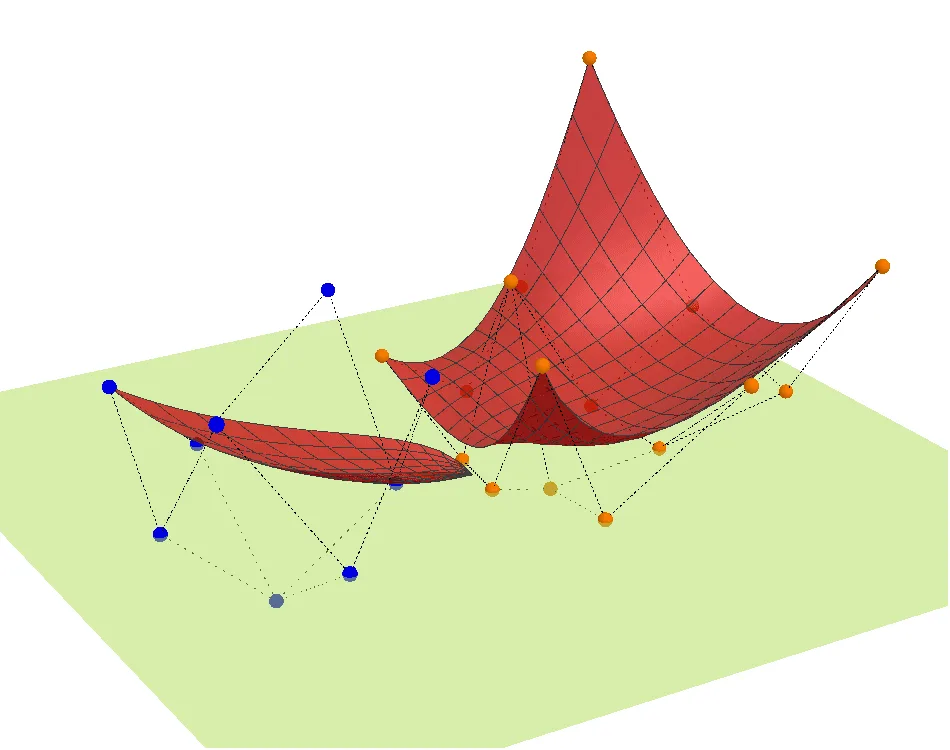
This GeoGebra applet demonstrates how to create three-dimensional graphics using Bezier surfaces, a fundamental concept in computer graphics and geometric modeling. Bezier surfaces are mathematical surfaces defined by a grid of control points that influence the shape of the resulting surface. By manipulating these control points, users can generate smooth, continuous, and aesthetically pleasing surfaces that are widely used in computer-aided design, animation, and engineering applications.
The applet showcases the construction of a Bezier surface through a systematic approach using several GeoGebra commands. The BezierSurface command forms the core of the construction, computing the surface based on the Bernstein polynomial basis functions that define how control points influence the surface geometry. The Sum command is employed to aggregate the contributions of individual control points, while the Surface command renders the final three-dimensional shape. Additionally, the Sequence and Zip commands are used to generate organized sets of points and parameters, and the Net3D command helps create a three-dimensional mesh or wireframe representation that reveals the underlying structure of the surface.
Users can interact with the applet by dragging the control points in three-dimensional space, observing in real time how the surface deforms and adjusts to the new positions. This interactive manipulation provides an intuitive understanding of how each control point exerts its influence on the overall surface shape. The control points act as attractors, pulling the surface toward them without the surface necessarily passing through them, which is a key characteristic of Bezier geometry.
From a mathematical perspective, this applet illustrates several important concepts. Students learn about parametric surfaces, where the surface is defined by two parameters typically ranging from zero to one. They encounter Bernstein polynomials, which serve as the blending functions that determine the weight of each control point at any given location on the surface. The applet also demonstrates tensor product surfaces, as a Bezier surface is essentially the product of two Bezier curves extended into three dimensions.
This example is particularly suitable for students studying three-dimensional geometry, computer graphics, and surface modeling. It bridges the gap between abstract mathematical theory and practical visual representation, making complex concepts accessible through interactive exploration. By experimenting with different configurations of control points, students develop spatial reasoning skills and gain insight into the mathematical foundations that underpin modern digital design and manufacturing technologies. The applet serves as an excellent introduction to parametric modeling and prepares learners for more advanced topics in differential geometry and computational design.
In collections
Interactive 3D Mathematical Surfaces
Loading the math board and drawing, please wait…