
Area of a Parallelogram Using Vector Dot Product
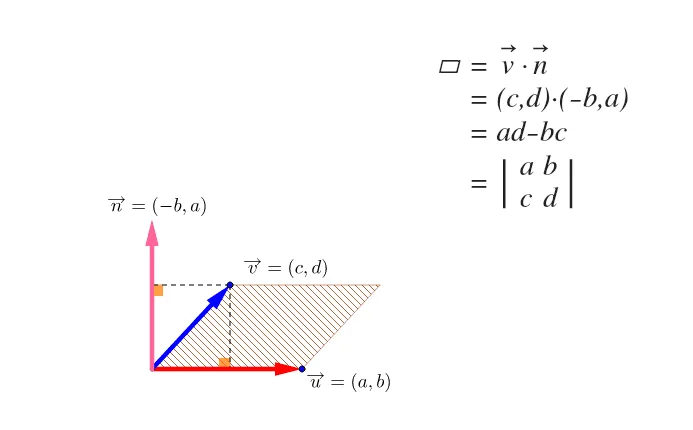
This GeoGebra example demonstrates how to calculate the area of a parallelogram using the dot product (scalar product) of vectors in a 2D Cartesian coordinate system. Through interactive construction of vectors, polygons, and angles, the applet visually illustrates the connection between vector algebra and analytic geometry, helping learners understand the practical application of vector operations in solving geometric area problems.
In the applet, users can manipulate the positions of the parallelogram vertices and observe how the vector representations and their dot product change dynamically. The construction highlights how the dot product relates to the projection of one vector onto another, providing geometric insight into the formula. By dragging points and exploring different configurations, students can see how the algebraic computation of the dot product corresponds to measurable geometric quantities. The visualization reinforces the relationship between the vector dot product, angle measurements, and the resulting area calculations, bridging abstract vector operations with concrete geometric interpretation. This hands-on exploration supports a deeper understanding of how vector methods can be applied to solve problems involving areas in coordinate geometry, making the abstract concepts of vector algebra more tangible and intuitive for learners.
In collections
矩陣
Loading the math board and drawing, please wait…