
Applying the Circumference Formula: Problem 11
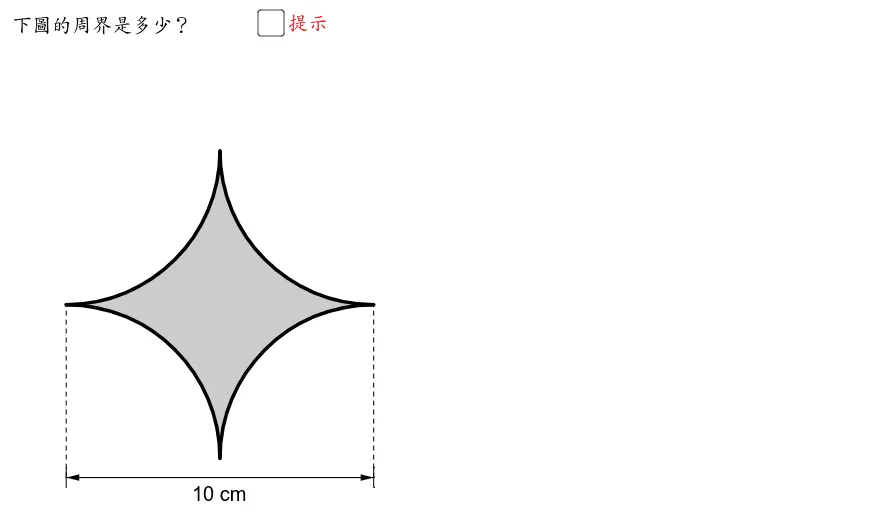
This GeoGebra applet, titled Applying the Circumference Formula: Problem 11, provides a comprehensive and interactive exploration of how to utilize the circumference formula to solve a specific, multi-step geometric problem. Designed as a dynamic learning tool for plane geometry, the application moves beyond rote memorization of formulas by allowing students to visually and interactively engage with the mathematical relationships between circles and various polygons.
At the core of this applet is the practical application of the circumference formula, alongside related concepts such as arc length and sector properties. The interactive model guides users through the step-by-step construction of complex geometric figures using fundamental elements like line segments, circles, sectors, and polygons. A key feature of this specific problem is the integration of mirror transformations, or reflections, which are used to demonstrate symmetry and construct intricate composite shapes. By applying these geometric construction commands, students can clearly observe how individual components, such as circular arcs and straight polygonal edges, combine to form a unified figure.
The visual interface intuitively illustrates the properties of circles and their related geometric figures. As students interact with the applet, they can manipulate key variables, such as the radius of the circle or the dimensions of the associated polygons. This real-time manipulation allows learners to instantly see how changes in these parameters affect the overall circumference, arc lengths, and total perimeter of the composite shape. The mirror transformations further enrich the visual experience by highlighting symmetrical properties, making it easier to deduce unknown lengths and simplify complex perimeter calculations.
From an educational perspective, this interactive model is highly beneficial for students aiming to deepen their understanding of circumference calculations and their practical applications in plane geometry. It bridges the gap between abstract algebraic formulas and concrete spatial reasoning. By breaking down Problem 11 into manageable, visual steps, the applet helps students develop critical problem-solving strategies, such as decomposing complex shapes into familiar sectors and polygons. Ultimately, this GeoGebra example serves as an excellent, engaging resource for mastering circular measurements, reinforcing geometric transformations, and building a robust foundation in advanced plane geometry.
Loading the math board and drawing, please wait…