
Annulus (Circle Ring) Circumference & Area: Using r₁²−r₂² Formulas
Loading the math board and drawing, please wait…
In collections
Kreis Umfang und Flächeninhalt
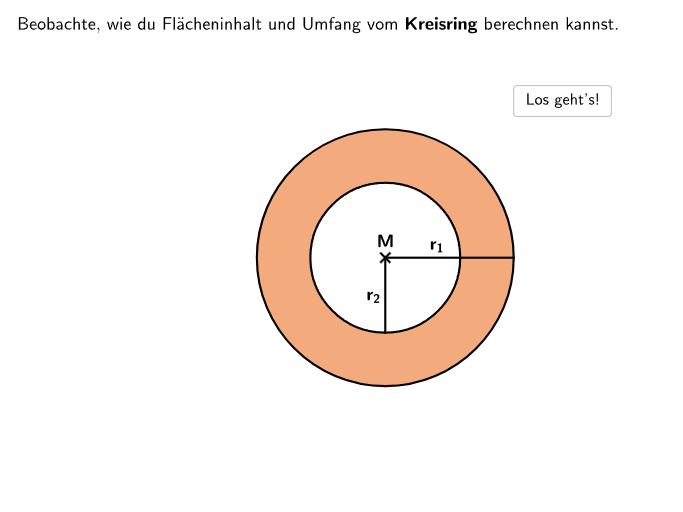
This GeoGebra example demonstrates how to compute the area and the circumference of an annulus formed by two circles with given radii r1 and r2. Students can practice both the direct formulas and answer multiple-choice questions that select the correct area and perimeter expressions. The key math concepts are the annulus area as the difference of two circle areas, A = π(r1² − r2²), and the annulus
GeoGebra Commands & Parameters
Sequence(Random[1, 10], i, 1, 10) → randomNumbers, {8, 2, 8, 7, 3, 2, 9, 10, 5, 4}Element(randomNumbers, Mod[questionCount, Length[randomNumbers]] + 1) → randomNumberTextfield(input) → inputBoxJoin({Sequence[Segment[Corner[4] + (pixMat * ((k * stepXY), 0)), Corner[4] + (pixMat * ((k * stepXY), maxY))], k, 0, maxX / stepXY], Sequence[Segment[Corner[4] + (pixMat * (0, (k * stepXY))), Corner[4] + (pixMat * (maxX, (k * stepXY)))], k, 0, maxY / stepXY]}) → RasterJoin({Sequence[Text[UnicodeToLetter[65 + k], Midpoint[Corner[4] + (pixMat * ((k * stepXY), maxY)), Corner[4] + (pixMat * (((k + 1) * stepXY), maxY))], false, true, 0, -1], k, 0, maxX / stepXY - 1], Sequence[Text[("" * k), Midpoint[Corner[4] + (pixMat * (maxX, ((k - 1) * stepXY))), Corner[4] + (pixMat * (maxX, (k * stepXY)))], false, true, 1, 0], k, 1, maxY / stepXY]}) → CapRasterSequence(Sequence[Corner[4] + (pixMat * ((k * stepXY), (m * stepXY))), k, 0, maxX / stepXY], m, 0, maxY / stepXY) → PRSegment(MP01, MP01 + (KreisRadius011, 0)) → segR011Segment(MP01, MP01 + (0, (-KreisRadius012))) → segR012Segment(MP091, MP091 + (KreisRadius091, 0)) → segR091Segment(MP091, MP091 + (0, (-KreisRadius092))) → segR092Segment(MP092, MP092 + (0, (-KreisRadius092))) → segR094Segment(MP092, MP092 + (KreisRadius091, 0)) → segR093SelectedIndex(dropdown031) → index031SelectedIndex(dropdown032) → index032SelectedIndex(dropdown071) → index071If(step ≟ 3, correctdd031 ∧ correctdd032, step ≟ 7, correctdd071, step ≟ 4, PDD041 ≟ PDDEnd042 ∧ PDD042 ≟ PDDEnd041, step ≟ 8, PDD081 ≟ PDDEnd082 ∧ PDD082 ≟ PDDEnd081, true) → clickableBtnNextText("\textsf{\bold{Zieh mich!}}", Midpoint[ParkPDD041, ParkPDD042] + (0, -0.5), false, true, 0, -1) → CapDD041Text("\textsf{\pi}", PDD081 + (0, 0.05), false, true, 0, 0) → txtDD081Text("\textsf{2\:r_1}", PDD082 + (0, 0.05), false, true, 0, 0) → txtDD082Text("\textsf{\bold{Zieh mich!}}", Midpoint[ParkPDD081, ParkPDD082] + (0, -0.5), false, true, 0, -1) → CapDD081Circle(MP01, KreisRadius011) → KreisSchraffierung1Circle(MP01, KreisRadius012) → KreisSchraffierung2Text("\textsf{r_2²}", PDD041 + (0, 0.05), false, true, 0, 0) → txtDD041Text("\textsf{r_1²}", PDD042 + (0, 0.05), false, true, 0, 0) → txtDD042Circle(MP092, KreisRadius011) → KreisArea093Circle(MP092, KreisRadius012) → KreisArea094